

OUR BLOG

iPad Pro - Security
When I told the guys here at OMSUK that I’d ordered an iPad Pro to replace my work laptop they had some concerns, mostly around security. However it’s far less of an issue on iPad than a traditional computer.
The first great thing about all modern iPads is that they’re all encrypted. It’s not really an option, it’s just on when you setup a passcode, TouchID or FaceID and one less thing to remember to do when you get the device from new. This means that if it’s stolen then our confidential information (and yours) is safe.
Encrypted, managed with MDM Enterprise Security Certificates, and passwords protected with FaceID; the iPad is business secure
When I told the guys here at OMSUK that I’d ordered an iPad Pro to replace my work laptop they had some concerns, mostly around security. However it’s far less of an issue on iPad than a traditional computer.
The first great thing about all modern iPads is that they’re all encrypted. It’s not really an option, it’s just on when you setup a passcode, TouchID or FaceID and one less thing to remember to do when you get the device from new. This means that if it’s stolen then our confidential information (and yours) is safe.
Of course it’s only as safe as the passcode which can be 4 numbers, 6 numbers or a full password. A secure password would be annoying to type every time but with FaceID all I have to do is to look at the iPad and it’s unlocked & ready to use. Fast, secure and convenient.
FaceID goes further though. I use iCloud Keychain for my personal passwords and information and that is also unlocked with FaceID. So if I want to login to my iCloud, Gmail or even bank account, all I have to do is look at the iPad.
To keep customer data separate and accessible to the rest of the team we use LastPass. This lets us store logins for customers systems, computers, email and much more and share that information with the appropriate people within OMSUK. The great thing about that is that it also uses FaceID, so I can go to your secure website, look at the iPad and it logs me in which is super convenient.
The iPad can also be managed with our MDM solution. This uses Enterprise Security Certificates to manage security settings on the iPad, allow it on our corporate WiFi and even lock or wipe the iPad in the event it was lost or stolen.
All this is possible on the Mac, but with FaceID on the iPad Pro it’s even more convenient to the point that it’s almost invisible to the user.

Spotting Scam Emails
We all remember the “I am a Nigerian Prince” scam emails from a decade ago which has become a pop-culture reference for scam emails.
These days, people are putting a lot more effort into trying to trick you into giving over your personal information and/or payment details. Some copy a genuine email that a company uses, including logos, then tweak it to help them get the details they need. They are often forceful and try and use scare tactics to make you fall for the scam.
We all remember the “I am a Nigerian Prince” scam emails from a decade ago which has become a pop-culture reference for scam emails.
These days, people are putting a lot more effort into trying to trick you into giving over your personal information and/or payment details. Some copy a genuine email that a company uses, including logos, then tweak it to help them get the details they need. They are often forceful and try and use scare tactics to make you fall for the scam.
Below is an email I received back in March claiming to be from Apple:
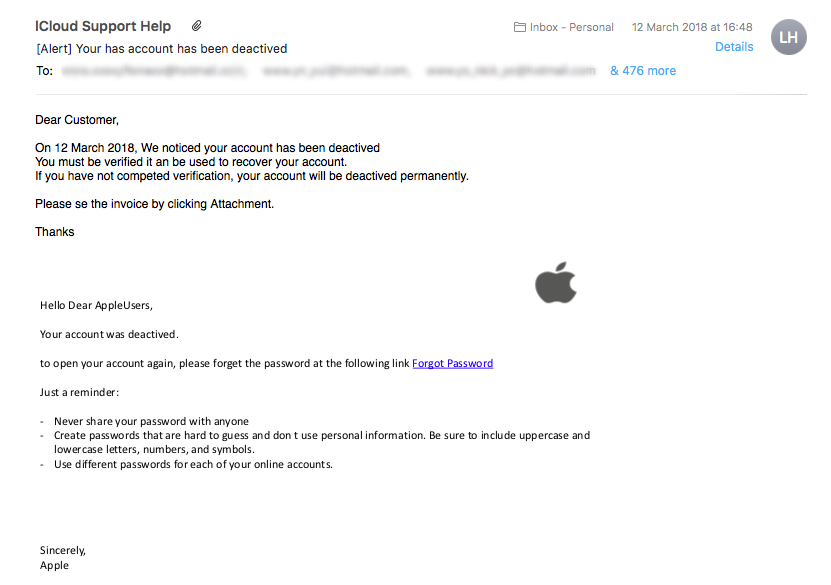
Here are some things to look for that can help you decide if this is a genuine email or a fake.
Full Contact Email
If you click on the downward arrow as you hover over the sender name you can view the actual email address that sent it.
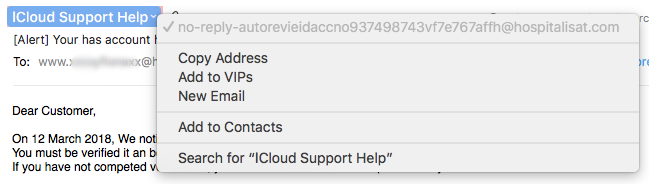
This is not an Apple address, so this just screams scam to me.
Multiple Recipients
If there is ever a problem with your account, why do 479 other people need to be receiving this email about your account?

Use of Language
Very often, scam emails have poor spelling and grammar. In the example email “You must be verified it an be used to recover your account.” has clearly not been proof read before sending.
They are often very forceful. Saying things will be deleted or removed permanently. This is a scare tactic to try and make you go along with their scam straight away.
If in Doubt
If you are unsure if it is a genuine email or not, close the email and visit the company website and contact them by the details they provide in their Contact page. That way you can be sure you are speaking to the real company and they can tell you if there is genuinely an issues with your account.
Anti-Spam/Anti-Scam Solutions
There are anti-spam services available to help stop these types of emails reaching your inbox in the first place such as Reflexion. This can help reduce the amount of junk and scam emails you receive.
If you would like to know more about products and services that could reduce your spam/scam email that lands in your inbox, please give us a call. One of our team would be happy to discus ways of helping you.

iPad Pro - Portability
When my MacBook Pro died at the end of last year I was faced with a decision; what do I replace it with. I looked at my requirements and top of the list was portability.
I looked at Apple’s laptop line-up and was stuck between the power of the MacBook Pro and the portability of the MacBook/MacBook Air. Then it occurred to me that there was another option; the iPad Pro.
Portable, lightweight, never-ending battery
When my MacBook Pro died at the end of last year I was faced with a decision; what do I replace it with? I considered at my requirements and top of the list was portability.
Looking at Apple’s laptop line-up I was stuck between the power of the MacBook Pro and the portability of the MacBook/MacBook Air. Then one other option occurred to me; the iPad Pro.
I picked up the 12.9” model for maximum screen size (mostly for multi-tasking) with 256GB of storage. It was a gamble, but one that 9 months later I’m over the moon with. The iPad Pro isn’t for everyone but for me it’s been a revelation.
The hardware retains the power of a MacBook Pro and while you lose the power of macOS, you also gain the power of iOS. It’s a different beast that takes a little getting used to but it’s works amazingly well.
Most importantly, this is the most portable device I’ve ever owned. It’s nearly half the weight of my last MacBook Pro (only 631g) and super thin. It fits in any bag and is so light you forget it’s even there. It works just as well on the couch, at a desk, in bed, on my lap or even on the floor. I work in all kinds of environments from offices to server rooms to coffee shops and can find a way to use the iPad in positions I just can’t use a laptop.
The other major revelation is the battery. With a genuine 10+ hour battery life it mostly lasts all day, which is more than I can say for my old MacBook Pro. Unlike the laptops, you can also use external battery packs. I picked up an Anker battery for about £35 that has another 2 full charges in it, meaning I don’t need to use the wall to power the iPad for over 30 hours of actual use. I can also use either the iPad or the battery to charge my iPhone too. This has been a life-saver when out and about, away for the weekend or when I’m sat too far away from an outlet for the charger to reach.
The iPad Pro has been a brilliant addition for me and I’m thoroughly enjoying using it. I’m planning to write some more blog posts about it so if you’re interested in how it’s working for me and how it’s fitting into my work then watch this space.

4 Ways To Raise A Ticket
We try to make it easy to raise a ticket, so we have 4 different ways. Since most people only know one or two, we thought we'd list them here.
We try to make it easy to raise a ticket, so we have 4 different ways. Since most people only know one or two, we thought we'd list them here.
Automated
Most of the time the tickets are raised automatically by your backups, server or other systems. In this case we take care of it for you and if you don't need to take any action we just close the ticket behind the scenes.
Website
Click Account Login at the top of this site and use your email address and password to access your tickets. If you can't remember your password there is a password reset option right there too. Once logged in you can view your tickets, invoices, agreements etc.
Probably the easiest way to raise a ticket is via email. Just email us and a ticket will be raised in your name and your account manager will be alerted. As ever, we'll look into it and get back to you ASAP.
Phone
If you have an emergency, or just don't have the time to raise a ticket (or if your internet is down!) you can always call us. 01865 882504 is all you need remember.

What Do We Use To Make Life Easier?
Everyone does things slightly differently, and we all want to make work a little easier. Here are some of our favourite little apps to help just a little every day.
Everyone does things slightly differently, and we all want to make work a little easier. Here are some of our favourite little apps to help just a little every day.
Caffeine - Stop your Mac sleeping
A free app that couldn't get any more simple. Once installed there is a coffee cup in your menu bar near the clock. If it's steaming your Mac won't sleep. If it's empty it will sleep as normal. Click once to change modes, once to change back—it's that simple. Great if you want us to remotely fix something while you're at lunch. Download it here.
TextExpander - Type common things quicker
TextExpander is a very cheap monthly service which allows you to instantly insert common snippets of text for emails, boilerplates, form fills and anything else you use text for using a quick search or abbreviation. Get it here.
We use it for our signatures for example. I type ;sig and it expands to:
Many thanks
Matt Cox | ACMT, ACTC, ACSP
Lead Engineer | Oxford Mac Solutions
50 Acre End Street, Eynsham, OX29 4PD
+44 (0)1865 882504 | matt.cox@omsuk.com | www.omsuk.com
DinoPass - Easy password generator
When you want a secure password, but you can't think of one, this is the place to look. It's simple, doesn't use any offensive words and the kids will love it too. Check out DinoPass here, it's free!